


CineDash
4.6678.00 Reviews
App Specs
- Version
- 1.0.2.0
- Updated On
- License
- Free
- Downloads
- 500,000+
- Developer
- Smart it support
- Categories
- Lifestyle
- Platform
- Android
Screenshots
 Analysis by AppCompare
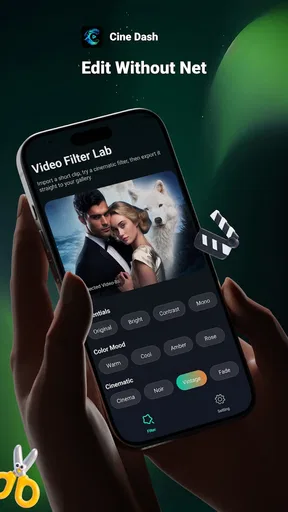
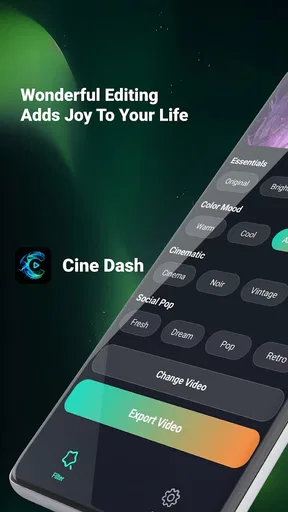
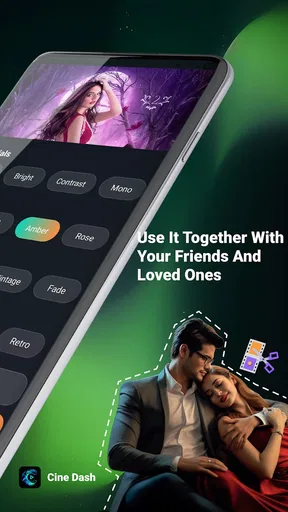
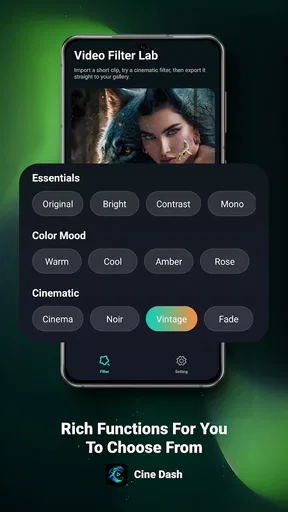
I’d approach CineDash as a practical video-editing tool rather than a film-discovery app: its purpose is to add filters to videos. That narrow focus can be useful when I want a quick visual change without turning a small edit into a larger production. It is a free lifestyle app from Smart it support, and its appeal depends on whether applying a filter is the main job I need done.
What a filter-focused workflow is good for
For an everyday clip, the useful question is not whether an app can do everything, but whether it helps me make one clear adjustment with little fuss. A filter can give several shots a more consistent look, or help a short video feel more intentional before I share it. CineDash is worth considering when that is the kind of edit I have in mind, rather than a project that needs detailed cutting, titles, or a carefully layered soundtrack.
A realistic use would be choosing a few clips from a walk, a meal, or a family gathering and deciding whether a filter makes them feel more cohesive. I would compare the result with the original before settling on it: a strong look that suits one shot can make another look too dark or overly stylized. That quick before-and-after check is a small habit, but it helps keep a simple edit from looking heavy-handed.
Speed expectations and the moments that demand more
Because the central task is adding a visual treatment, I would expect the editing process to feel most straightforward with short, ordinary clips. Longer or more demanding footage can make any video workflow feel less immediate, so I would avoid assuming that a filter-focused app is also the best place to handle a large batch or a complex project. If I had several clips to prepare, I would test one first and decide whether the pace suits the rest of the job.
That trial also makes it easier to spot practical friction before I have invested time. I would check that the chosen look works across different lighting conditions, then review the finished clip rather than judging only from a preview. A filter may flatter bright outdoor footage but be less kind to an indoor scene; using one consistently does not mean every shot will benefit equally.
Reliability, device fit, and sensible expectations
I would treat stability as something to judge during an actual edit, not infer from a short store summary. Video work asks more of a device than simply reading text or browsing still images, and a phone’s available space and general condition can affect how comfortable an editing session feels. Keeping the first test modest is sensible: use a short clip, make the adjustment, and confirm the result before relying on the app for a time-sensitive post.
CineDash is listed for Android 7.0 and later, which gives older compatible devices a possible route to trying it. Compatibility alone does not guarantee equal performance across phones, though. If a device is older or already struggles with video, I would keep expectations measured and avoid starting with a lengthy edit. The current release is version 1.0.1.2, so I would also make sure I am using the current version available to me before judging how it behaves.
Worth Reading Before You Choose

EA SPORTS FC Mobile 26 Is a Bigger Football Game, but It Takes Time

Flipboard Shows What News Apps Must Do Beyond the Feed

Switching to Android Auto Means Rethinking Your Driving Routine

Google Calendar Makes a Crowded Week Easier to Manage

Ludo King Makes the Most of the Minutes Between Plans

Baby Panda World Brings Quick Play to Modern Phones, but Its Game Library Feels Busy
How CineDash Fits into a Video Routine
For someone who usually reaches for a phone’s built-in editor, the choice comes down to whether CineDash makes filter selection more convenient or expressive for their needs. The built-in option may be the better fit when trimming and basic adjustments are already enough. A broader editing app makes more sense when a clip needs several kinds of changes, while a focused filter tool can be appealing when I want to alter the mood and move on.
That distinction matters for sharing, too. If I am preparing a quick clip for friends, a simple filter pass may be all I want. If I need precise control over color, multiple edits, or a repeatable look across a larger project, I would compare the result with a full editor before committing. The best choice is the one that matches the task, not the one with the longest feature list.
Who is likely to enjoy it
I can see CineDash suiting casual creators who want to experiment with the appearance of short videos without making editing a hobby. It may also be handy for someone who regularly posts clips and wants a quick way to explore different moods. I would be less likely to recommend it as a primary studio for someone who needs detailed timeline work or predictable, fine-grained adjustments; a more comprehensive editor is a better match for those demands.
One useful approach is to decide on the feeling before opening the editor. For example, a clip meant to feel warm and relaxed calls for a different treatment from one intended to look crisp and lively. Testing a couple of options against that intention is more effective than cycling through filters at random. It also reduces the chance of spending time on decoration that does not improve the video.
What the audience response suggests
The app has an average rating of 4.6 from around 8,200 ratings, with about 243 written reviews and over 100,000 installs. Those figures suggest that it has attracted a real audience, but they cannot tell me whether its particular workflow suits my phone or editing habits. I would use them as context, then make my own short test before relying on it regularly.
It is free and rated for Everyone, which lowers the barrier to trying it, especially for a household looking for a straightforward video-filter app. The practical decision is still personal: someone who wants a lightweight creative experiment may find the idea appealing, while a user who expects a full video suite should look elsewhere. I would start with one nonessential clip and see whether the process feels clear and the result is worth keeping.
My performance verdict
My view is that CineDash makes the most sense when I want to change the feel of a video without turning the task into a full edit. Its filter-first purpose is a strength for quick experiments and a limitation for anyone who needs a deeper toolkit. I would begin with a short clip, compare the treated version with the original, and check the exported result before building a regular routine around it.
If that focused workflow matches what you need, CineDash is a reasonable free app to try. If your priority is detailed control, multi-step editing, or dependable handling of demanding projects, I would choose a fuller editor instead. The app is best judged by that simple test: does it help your everyday clips look closer to what you had in mind, without asking you to do more editing than the job requires?
Hey there, fellow app explorers! I recently got my hands on a new app called CineDash, and let me tell you, it's a game-changer for all movie buffs out there. If you're into movies as much as I am, you're going to want to stick around for this one.
Discovering the World of CineDash
So, what's the deal with CineDash? Imagine having all the movie information you need right at your fingertips, and I mean everything. From the latest releases to classic hits, this app has got it all covered. It's like having your personal movie encyclopedia in your pocket.
When I first opened the app, I was greeted with a sleek and intuitive interface. No fluff, no clutter—just a smooth, user-friendly experience. The home screen showcases the latest trending movies, making it easy to dive right into what's hot right now.
Features That Make It Stand Out
One of the coolest features I found is the personalized recommendation engine. Based on your viewing history and preferences, CineDash suggests movies that you might actually enjoy. It's like having a friend who just gets your taste in films.
Another nifty feature is the detailed movie database. Each movie page includes a comprehensive overview, cast list, trailers, and even user reviews. Ever found yourself wondering where you recognize an actor from? Problem solved. Just tap on the actor's name to see their full filmography.
If you're like me and love a good trivia night, you'll appreciate the trivia section. It’s packed with fun facts about movies, directors, and actors. Perfect for those "Did you know?" moments at parties.
The Social Aspect
Now, let's talk about the social features. CineDash allows you to connect with friends and see what they're watching. You can share recommendations, comment on movies, and even create watchlists together. It's like having a virtual movie club, and who doesn't love a good movie night with friends?
There's also a community forum where users can discuss movie theories, upcoming releases, or just geek out about their favorite films. It's a great place to connect with like-minded movie fans.
A Few Minor Hiccups
No app is perfect, and CineDash is no exception. While the app runs smoothly most of the time, I did encounter a couple of minor glitches. Occasionally, the app took a bit longer to load certain features, especially when browsing through extensive cast lists. Hopefully, future updates will iron out these kinks.
Another thing to note is that the app is ad-supported. While the ads aren't overly intrusive, some users might find them a bit distracting. But hey, it's a small price to pay for a free app with such a wealth of information.
Final Thoughts
All in all, CineDash is a must-have for any movie enthusiast. It's got a little bit of everything, from personalized recommendations to a bustling movie-loving community. Whether you're a casual viewer or a cinema aficionado, this app will enhance your movie-watching experience.
So, if you're ready to dive into the world of movies like never before, give CineDash a try. You won't be disappointed. Happy movie watching, folks!
Pros
- User-friendly interface enhances navigation.
- Extensive database of movies and series.
- High-quality streaming with minimal buffering.
- Personalized recommendations based on viewing history.
- Regular updates with new content and features.
Cons
- Requires a stable internet connection.
- Subscription needed for premium features.
- Limited offline viewing options.
- Occasional ads in free version.
- Some regional content restrictions apply.
FAQs for CineDash
What is CineDash and what features does it offer?
CineDash is an innovative app designed for movie enthusiasts. It offers features like personalized movie recommendations, trailers, showtimes, and ticket purchasing options. Users can also create watchlists, rate movies, and participate in community discussions. Its intuitive interface ensures a seamless experience for users to discover and enjoy films.
Is CineDash available for both Android and iOS devices?
Yes, CineDash is available for download on both Android and iOS platforms. Users can access the app through the Google Play Store for Android devices and the Apple App Store for iOS devices. This ensures a wide range of compatibility and accessibility for all users.
Does CineDash offer any subscription plans or is it free to use?
CineDash offers a free version with essential features available to all users. However, for those looking for an enhanced experience, there are premium subscription plans. These plans provide additional benefits such as ad-free browsing, exclusive content, and advanced customization options.
Are there any social features available within CineDash?
Yes, CineDash includes several social features to enhance user interaction. Users can follow friends, share movie reviews, and join discussion forums. The app encourages community engagement, allowing users to connect with fellow movie buffs and exchange recommendations or reviews.
How reliable is CineDash for purchasing movie tickets?
CineDash partners with reputable cinema chains, ensuring a reliable and secure ticket purchasing process. Users can browse available showtimes, select seats, and complete transactions directly within the app. This streamlined process guarantees a convenient and trustworthy way to book movie tickets.


